 WebReview
As an Amazon Associate I earn from qualifying purchases. Links below are affiliate links; the price you pay is unchanged.
Basis: PULWTOP's Amazon listing (bullets, stated limits and compatibility notes). WebReviewStar has not independently tested this unit.
Review summary
The short answer
Buy it if you have a Windows laptop with full-featured USB-C, a spare 65W+ PD charger, and two HDMI monitors. Skip it if you use a Mac, if you need video out of a USB-C port, or if your laptop is the only power adapter you own — the dock does not include one, and without it you get no charging.
Buy it if
- You run Windows on a laptop with USB-C 3.2 or Thunderbolt 3/4/5
- You want two monitors on HDMI and have those cables already
- You own a 65W or higher USB-C PD charger to feed the dock
- You want the laptop stood up and out of the way rather than flat on the desk
Skip it if
- You use a Mac of any kind — the listing excludes them in capitals
- You expect video from the USB-C ports; they are data only
- You have only 4K monitors and no DisplayPort alternative
- You want the dock to power the laptop with no other charger
What it actually is
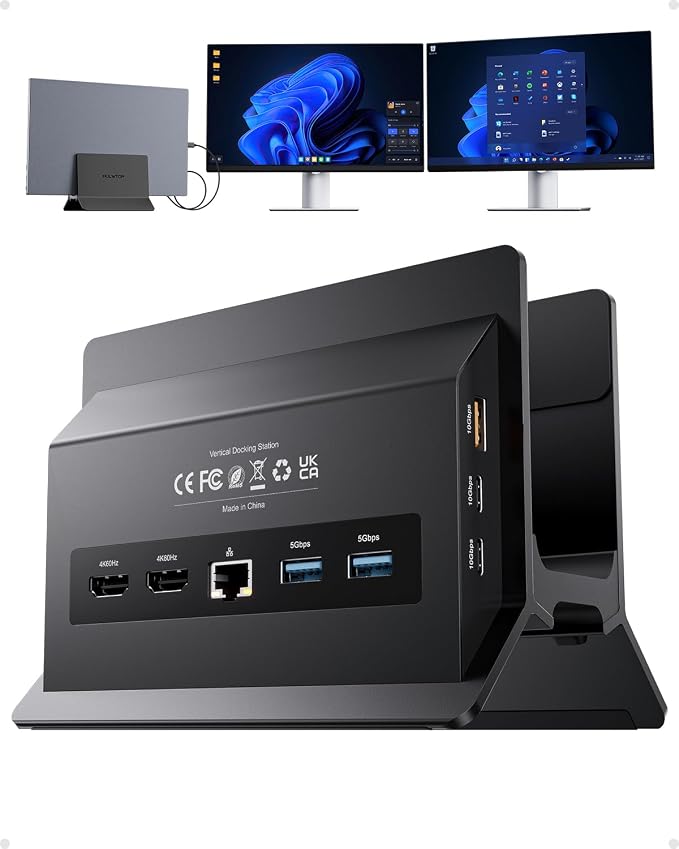
A USB-C dock built into a vertical laptop stand. The laptop leans against one side, the dock presents its ports on the other, and one USB-C cable carries everything.
Eleven ports in total: 2× HDMI (4K@60Hz), 2× USB-C 3.2 Gen 2 (10Gbps), 1× USB-A 3.2 Gen 2 (10Gbps), 2× USB-A 3.0 (5Gbps), 1× USB-A 2.0, Gigabit Ethernet, USB-C PD input and USB-C host.
The listing tells you what is wrong with it
Most docks hide their conditions in a manual. This one puts them in the bullets, in note form, and it is worth quoting them because they are the buying decision:
"NOT Support for Mac Users"
"USB-C ports are data-only (no video output or charging)"
"Power adapter not included. A 65W or higher PD adapter is recommended"
"For clamshell mode with an external display, connect a PD adapter to the PD port and a mouse to a USB 2.0 port to wake up the screen"
That last one is unusually specific, and it explains a port that would otherwise look like filler. A dedicated USB-A 2.0 port on a 2025 dock seems backward until you read the note: waking a closed laptop on an external display needs a mouse, and USB 2.0 is the most reliable place for an input device to live.
What works
- Eleven ports in a body that doubles as a laptop stand
- Two independent 4K@60Hz HDMI outputs with MST
- 10Gbps on the USB-C and one USB-A port, not just 5Gbps everywhere
- A dedicated USB-A 2.0 port for a mouse — which is what clamshell wake actually needs
What doesn't
- Windows only. Not a compatibility caveat, an exclusion
- No power adapter in the box, and it will not charge without one
- 100W in, 85W out — a 65W charger delivers 50W to the laptop
- USB-C ports are data only, so no video and no charging through them
The Windows-only thing
This is not a "compatibility may vary" caveat. The listing excludes Macs in capitals, twice.
Part of the reason is structural. Macs do not support MST — Multi-Stream Transport, the mechanism that lets one connection carry two independent displays. On Windows, two 4K outputs from one USB-C link is normal. On macOS, the same hardware gives you mirrored screens or one display, depending on the model. A dock advertising dual independent 4K is advertising something macOS will not do for it.
If you are on Windows, this is a non-issue. If you are on a Mac, no driver or firmware update changes it.
Power: the arithmetic nobody reads
The dock takes up to 100W in and passes 85W to the laptop. The missing 15W runs the dock itself — Ethernet, two display outputs and five USB ports are not free.
So the number on your charger is not the number your laptop sees:
| 100 W | 85 W |
|---|---|
| 90 W | 75 W |
| 65 W | 50 W |
The listing recommends 65W or higher. For a thin laptop that is fine. For a 16-inch workstation that wants 100W on its own, 85W through the dock is a slow trickle under load — and 50W from a 65W brick is not enough to charge at all while working.
And there is no adapter in the box. Moving from a standalone dock to this one means the charger you were using for the laptop now becomes the dock's charger, and the laptop charges through it. Budget for one if you do not have a spare.
The two 4K monitors, and the one that is not 4K
Two independent 4K@60Hz displays over HDMI is the headline. It is genuinely useful — and it is worth being precise about what it means for gaming monitors, because this is where docks quietly cost you what you paid for.
A 4K@60Hz output is defined by the dock's link, not by the monitor. An ultrawide that runs 165 Hz on DisplayPort will run at its HDMI ceiling through this dock, because there is no DisplayPort output on it at all. On the Samsung Odyssey G5 reviewed here, that ceiling is 100 Hz — the dock does not get you the 165.
That is not a flaw in the dock. It is a mismatch worth knowing before you buy it to drive a high-refresh panel.
A dock's port list is a promise about bandwidth, not about what your monitor can do. Read the two together or you will be disappointed by the monitor.
What it does well
The stand-and-dock combination is the real idea. Vertical laptop stands exist to save desk space and improve cooling; docks exist to sit in a tangle behind the desk. Merging them means one object, one cable, and a laptop that is out of the way.
10Gbps ports are not universal on this dock — two USB-C Gen 2 and one USB-A Gen 2 at 10Gbps, with the rest at 5Gbps and one at 2.0. That is a sensible split for a workstation: fast storage gets the fast ports, keyboards and printers do not need them.
Gigabit Ethernet is the port that matters most for anyone using this for work. Wi-Fi dropping during a call is the failure people buy docks to stop.
Who it is for
A Windows user with a laptop, two monitors, a wired network and a power adapter to spare. In that configuration it is a tidy, well-specified single-cable dock at a price that undercuts the branded ones.
Anyone on a Mac, anyone whose monitors are DisplayPort-only or high-refresh, and anyone expecting the dock to supply power out of the box should look elsewhere — and the listing says so itself, which is more than most do.
Questions
Does it work with a Mac?
No. The listing states "NOT Support for Mac Users" in its own bullet. This is a Windows dock.
Can I use the USB-C ports for a third monitor?
No. The listing is explicit that the USB-C ports are data only, with no video output and no charging.
Does it come with a power supply?
No. The listing says the power adapter is not included and recommends 65W or higher PD. Without one, the dock will not charge the laptop.
What is the 85W figure?
From a 100W input the dock passes up to 85W to the laptop. Feed it a 65W charger and the laptop sees roughly 50W, because the dock consumes the difference.
Will it drive my 165Hz monitor at 165Hz?
Not over HDMI. The dock's HDMI outputs are 4K@60Hz. A monitor that needs DisplayPort for its highest refresh will run at its HDMI ceiling through this dock.
Sources
The bottom line
If it suits how you actually use your network, this is the one to buy.
Check price on AmazonWas this review useful?
Thanks — that helps.
Comments
No comments yet. If something here is wrong or missing, say so — corrections get fixed.