 WebReview
As an Amazon Associate I earn from qualifying purchases. Links below are affiliate links; the price you pay is unchanged.
Basis: TP-Link's Amazon listing (specifications, compatibility and safety claims). WebReviewStar has not independently tested this unit.
Review summary
The short answer
Buy it if you want to know what a heater, a tumble dryer or a desktop actually costs to run, and you are comfortable adding a 2.4GHz-only device to your Wi-Fi. Skip it if your router publishes a single combined network name and you cannot split it — you will fight the pairing screen every time.
Buy it if
- You want per-appliance energy data rather than guesswork from the utility bill
- The appliance draws under 15A and you want it switched automatically
- You use Alexa, Apple Home, Google Home or SmartThings and want one plug to work with all of them
- You are willing to put it on a 2.4GHz network
Skip it if
- You need it on 5GHz, or you cannot separate your bands during setup
- You want fully local control with no vendor account
- The load is above the plug's rating
- You expect it to measure appliances plugged in overnight with no schedule and no data review
What it actually is
A Wi-Fi smart plug with an energy meter inside it. The "P110M" model number matters for one letter: the M is Matter, the interoperability standard that lets a device pair with Apple Home, Google Home, Alexa or SmartThings without the manufacturer's own hub.
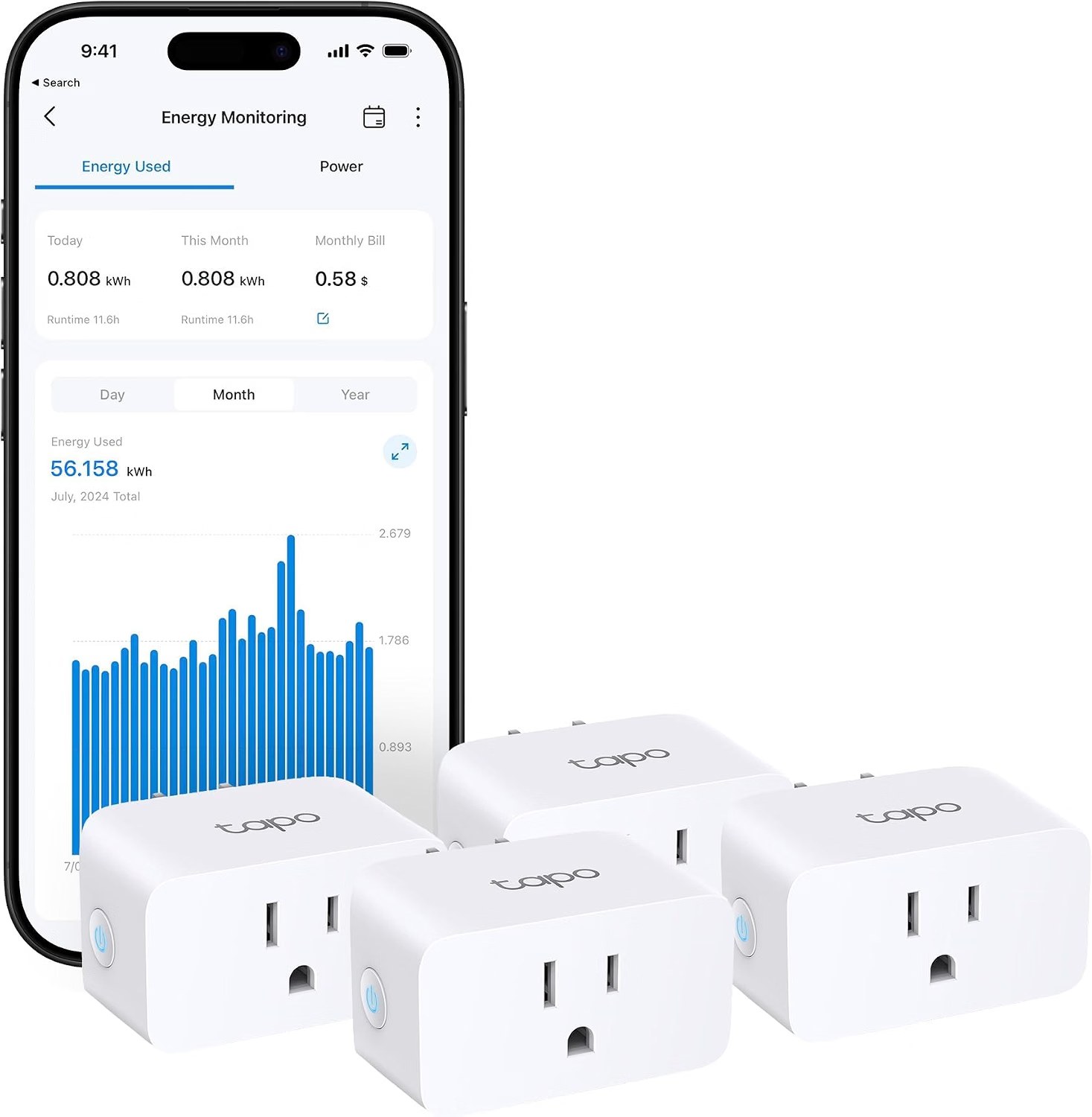
Four in a pack. That is a more useful quantity than it sounds — measuring the cost of one appliance tells you very little, because you do not know if you are looking at an outlier. Four lets you meter the things that actually matter at once.
Energy monitoring is the whole point
A smart plug that switches is a cheap accessory. A smart plug that measures is a diagnostic tool, and this one reports in the units that change behaviour: kWh over time, not just a live wattage figure.
That distinction is worth stating plainly. A live reading tells you what the appliance is doing right now. A kWh total tells you what it cost you. The listing goes further and estimates a bill figure, which is useful and worth understanding: it is calculated from a tariff you enter yourself. If your electricity price changes and the app is not updated, the cost estimate drifts. The kWh figure stays right; the money figure is only as good as what you told it.
The real value is in finding the appliance that quietly costs more than it should — an old fridge, a tumble dryer, a gaming PC left on. That is a discovery you only make by measuring.
What works
- Matter-certified, so one plug works across the major platforms rather than locking to one
- 15A rating, higher than the 10/13A plugs that trip on heaters
- Energy history in kWh and an estimated cost figure, not just a live wattage readout
- Overload protection that cuts power on a set threshold
- Four plugs in the pack, which is the sensible number for actual measurement work
What doesn't
- 2.4GHz Wi-Fi only, and the listing says so in the title
- The cost estimate is only as good as the tariff you type in
- Energy data lives in the vendor app, so it depends on their cloud
- The listing says "UL Certified" while the packaging graphic shows the ETL mark
The 2.4GHz thing
The product title says "2.4G Wi-Fi Only", which is refreshingly honest and also the main thing to check before buying.
2.4GHz is the correct choice for smart home devices — it reaches further and passes through walls better than 5GHz, and a plug does not need bandwidth. The problem is not the radio; it is setup. If your router presents one network name for both bands and auto-steers clients, the plug may not be able to join during pairing.
Most routers will let you split the bands or pin a 2.4GHz-only network for the setup, and after pairing the plug tends to stay put. But it is a real step, and the reason smart plugs get returned, and it is why the listing puts it in the title rather than the bullet list.
A 2.4GHz-only radio is not a limitation of the product. It is a question about your router's configuration, and the product wins that argument most of the time.
The safety label — two different claims
The listing title says UL Certified. The product graphic says ETL Safety Certified, with the Intertek mark.
These are not the same thing. UL is Underwriters Laboratories; ETL is Intertek. Both are Nationally Recognized Testing Laboratories in the US, and both do the same basic job — independent safety testing to a standard. But they are separate organisations, and a product graphic showing the ETL mark does not make the product UL certified.
It is likely one word in the title doing duty for "safety certified" in general. That is the kind of small loose claim this site checks rather than repeats: if you are buying a plug to sit on a 15-amp circuit, you should know which lab tested it.
What 15A buys you
Most smart plugs are rated at 10A or 13A. 15A is higher than the common case, and the difference decides what the device can safely sit between.
A mains heater, a tumble dryer, a kettle drawing at its UK-maximum — these draw a lot, and a plug that trips under load is worse than useful. The listing pairs the 15A rating with overload protection that cuts power above a set threshold, which is the right second layer.
The rule is not "15A means anything goes". It is "check the appliance's rating on its own label, not the plug's headline number".
Where it sits among smart plugs
The Matter certification is the reason to pick this over an older plug. Without it, a plug is tied to one ecosystem and you discover the entanglement when you change your mind about which assistant you use.
With it, the plug presents to Apple Home and Alexa and Google Home on equal terms, and which one you command it from becomes a choice rather than a purchase.
The honest cost is data. Energy history lives in the TP-Link app, which means the measurement feature — the actual reason to buy this model — depends on TP-Link's cloud and account. Scheduled switching and the physical button keep working without it. If you want genuinely local energy monitoring, that is a different product class and a hub you will pay more for.
Who it is for
Someone with a few appliances whose cost they are guessing at, on a 2.4GHz-capable network, using more than one of the major smart home platforms.
Not someone who wants zero cloud dependency, and not someone whose 15-amp circuit already has an uncertain load on it.
Questions
Does it need a hub?
No. P110M connects over 2.4GHz Wi-Fi directly and is Matter-certified, so it pairs with a Matter controller such as Apple Home, Google Home, Alexa or SmartThings without a separate TP-Link hub.
Can it run on 5GHz Wi-Fi?
No. The listing states 2.4GHz only in the product title. During pairing the plug must be able to see a 2.4GHz network.
How much power can it switch?
The listing rates it at 15A. Check the appliance's own rating rather than assuming 15A covers anything with a plug on it — a heater or dryer is the case to check.
Is it UL certified?
The listing's title says UL certified, but the product graphics show the ETL mark from Intertek. Those are different certification bodies. Both indicate independent safety testing; report them accurately rather than repeating the listing's wording.
Can I use it without the internet?
Scheduled switching and the physical button work regardless, but energy history and app-based control depend on the TP-Link cloud. Matter gives you some local control depending on which hub you use.
Sources
The bottom line
If it suits how you actually use your network, this is the one to buy.
Check price on AmazonWas this review useful?
Thanks — that helps.
Comments
No comments yet. If something here is wrong or missing, say so — corrections get fixed.