 WebReview
As an Amazon Associate I earn from qualifying purchases. Links below are affiliate links; the price you pay is unchanged.
Basis: UGREEN's Amazon listing (power figures, capacity, dimensions and cable advice). WebReviewStar has not independently tested this unit.
Review summary
The short answer
Buy it if you travel with a laptop and want one brick that covers it and two other things at once. Skip it if you want something pocketable — at 0.48 kg and a column shape it lives in a bag, not a pocket — or if your devices never exceed 30W, where most of what you paid for is unused.
Buy it if
- You carry a USB-C laptop and want to charge it from a bag
- You want to see actual wattage rather than guess whether fast charging engaged
- 72Wh fits under the 100Wh airline limit for carry-on
- You will use the supplied cable rather than an unmarked one
Skip it if
- You want a pocket power bank — this is 0.48 kg
- Your phone is your only device; 100W of it is wasted
- You need to charge four things at once
- You will not use a certified 5A cable
What it actually is
A 20,000mAh power bank with a 130W ceiling, three ports and a colour display. The capacity number is the familiar one; the wattage and the display are what separate it from an ordinary phone bank.
UGREEN describes it as 20000mAh and 72Wh, which is the number that matters for travel — and the shipping details list four lithium-ion cells inside, which explains both the weight and the size.
The 130W number, unpacked
The box says 130W. The listing is more specific:
"the maximum output power of the OUT1 port is 100W"
So the ports are not 130W each. The bank's total output is capped, and 100W of it is available on the primary port. Plug in a second device and the remainder is shared.
That is normal, and it is also the thing people get wrong when they buy on the headline number. A 130W bank does not charge three laptops. It charges one laptop, or one laptop and a phone, or three phones quickly.
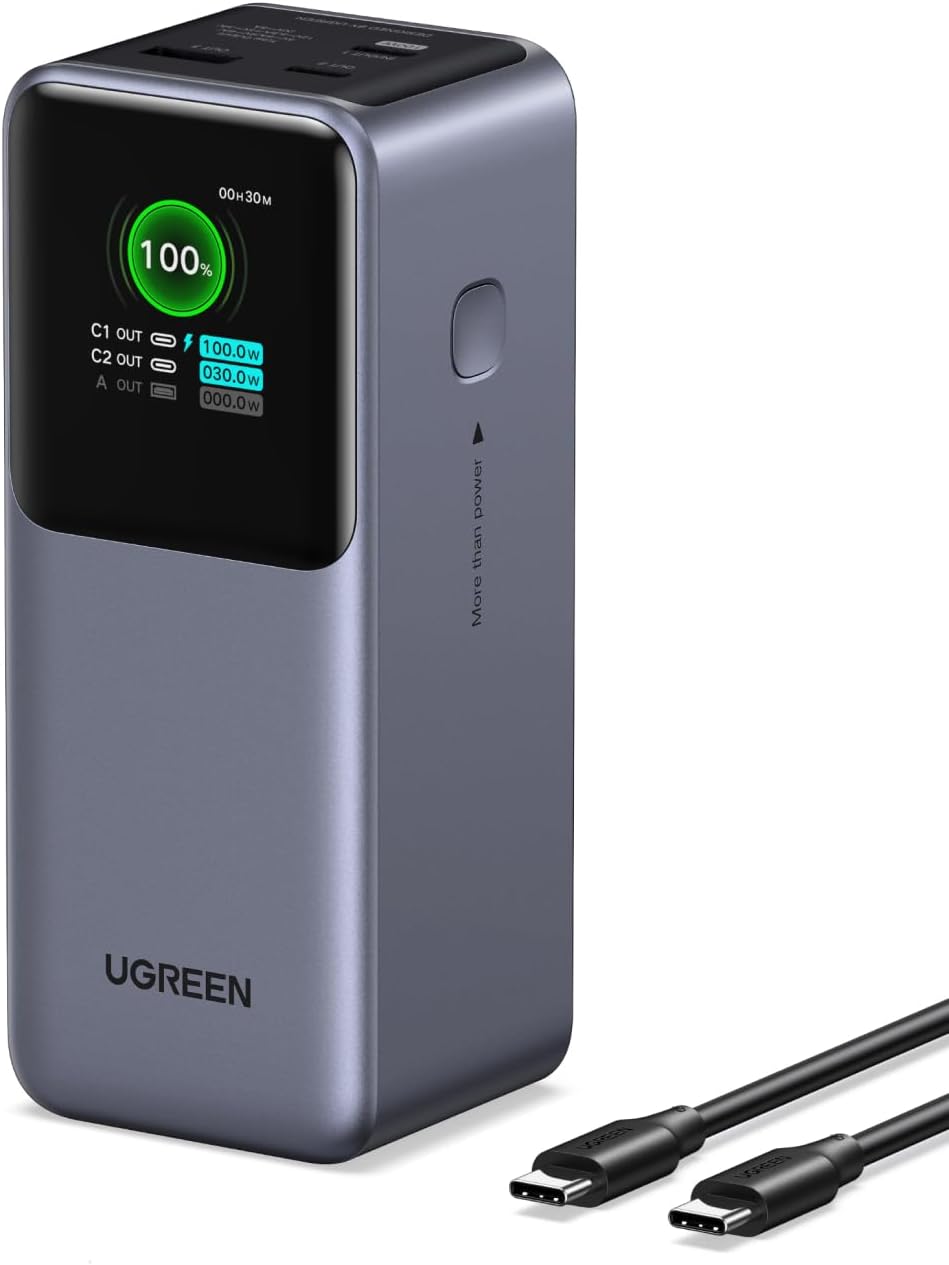
The display is what makes this liveable rather than annoying. Watching C1 at 100.0W and C2 at 30.0W tells you immediately that the budget has been allocated and where. A five-LED bank tells you nothing about that, and you spend the trip wondering why the laptop is charging slowly.
A power bank that shows its own arithmetic saves you from having to guess it.
What works
- 100W on the primary port is enough for a 16-inch laptop
- 72Wh stays inside the airline carry-on limit
- A TFT display showing real-time watts per port, not a five-dot bar
- 20,000mAh gives roughly four phone charges or most of a laptop charge
- Three ports, so laptop and phone together without deciding
What doesn't
- 130W is the shared budget across three ports, not a per-port figure
- 0.48 kg and a column shape; it is not a pocket device
- Full speed depends on the included 5A cable — UGREEN warns about others
- Four lithium-ion cells inside a 72Wh pack, so it is a checked-item question at security
Why the display is the actual feature
Most portable chargers communicate in lights. This one reports remaining percentage, estimated time to full, per-port output, voltage, current and input power.
Two of those are genuinely useful and one is underrated:
- Per-port wattage — confirms whether PD negotiated at 100W or fell back to 30W because of the cable
- Estimated time remaining — a far better answer than a percentage when you are deciding whether to plug in now
- Input power — tells you whether your charger is refilling the bank at full speed, which is where cheap chargers quietly disappoint
The TFT is also the reason the column design works. The device is 2.1 x 2.0 x 5.1 inches and 0.48 kg — a brick, honestly described as palm-sized rather than pocket-sized. But with a display on one face, you do not need to press anything to check it.
The cable warning
UGREEN includes a 5A USB-C to USB-C cable and says this about other cables:
"Using non-certified or low-quality cables may cause unstable charging, reduced output/input power, or connection issues"
This is not marketing. To carry 100W over USB-C, the cable must be electronically marked with an e-marker chip that declares its current rating; without one, the charger and device will negotiate a lower safe limit. A cable that works fine for a phone at 20W can bottleneck this bank at 30W.
Practical upshot: keep the supplied cable with the bank, and if you replace it, buy one explicitly rated for 100W or 5A.
Airline rules, precisely
The listing calls it "airline approved". The precise version:
- 72Wh is under the commonly used 100Wh carry-on threshold
- It must go in carry-on, not checked baggage
- Four lithium-ion cells is the detail behind "lithium batteries required (included)" — relevant if an airline asks you to declare it
Worth knowing rather than assuming: airline rules vary by carrier and country, and the 100Wh figure is a widely adopted limit rather than a universal law.
What it weighs, literally
0.48 kg. That is a bag item. In a jacket pocket, no; in a laptop bag next to the machine it is charging, yes.
The column shape helps. It is narrower than a flat slab of the same volume, so it stands vertically in a bag pocket, and the rounded case means it does not eat through a sleeve on the way.
Who it is for
Someone who travels with a USB-C laptop and a phone, wants one device that covers both, and values knowing what is happening over saving 150 grams.
Not someone whose life is a phone and a pair of headphones. At 30W and below, a 20,000mAh bank for a fraction of the price does the same job — and this one's 100W port will sit unused.
Questions
Is 130W per port?
No. 130W is the total the bank can deliver. The listing states OUT1 provides up to 100W. Add a second and third device and the budget is divided.
Can I take it on a plane?
Yes, in carry-on. It is 72Wh, and the common limit for lithium batteries carried by passengers is 100Wh. Check it in checked baggage and it is a different question.
Will it charge a 16-inch MacBook Pro?
The listing claims 43% in 30 minutes on a MacBook Pro 16 with the primary port. That is achievable in principle at 100W, but it depends on the laptop negotiating PD correctly and on the cable.
Does the display matter?
It is the feature that makes the shared-budget design manageable. Seeing 100.0W on C1 and 30.0W on C2 tells you instantly when a port has been throttled.
Why does UGREEN recommend its own cable?
The listing states non-certified or low-quality cables may cause unstable charging or reduced output. 100W over USB-C needs an electronically marked cable, and not every cheap cable is one.
Sources
The bottom line
If it suits how you actually use your network, this is the one to buy.
Check price on AmazonWas this review useful?
Thanks — that helps.
Comments
No comments yet. If something here is wrong or missing, say so — corrections get fixed.