 WebReview
As an Amazon Associate I earn from qualifying purchases. Links below are affiliate links; the price you pay is unchanged.
Basis: Jackery's Explorer 1000 v2 user manual (JE-1000D), the Amazon listing, and the supplied product image. WebReviewStar has not independently tested this unit.
Review summary
The short answer
Buy it if you want a battery that will still hold most of its capacity in a decade, and you are shopping for outages, camping or a van. Skip it if you want it to keep a desktop or a server alive — Jackery's own manual rules that out, in writing.
Buy it if
- You want LiFePO4 chemistry and the 4000-cycle rating that comes with it
- 1500W continuous is enough for your fridge, router or tools
- You accept 20ms transfer and will only run tolerant devices on it
- You want USB-C 100W without a separate brick
Skip it if
- You need true online UPS behaviour for a desktop or server
- You expect the 10ms the listing advertises
- You want solar without buying panels separately
- You need more than about 1kWh, which is under a day of a large fridge
What it actually is
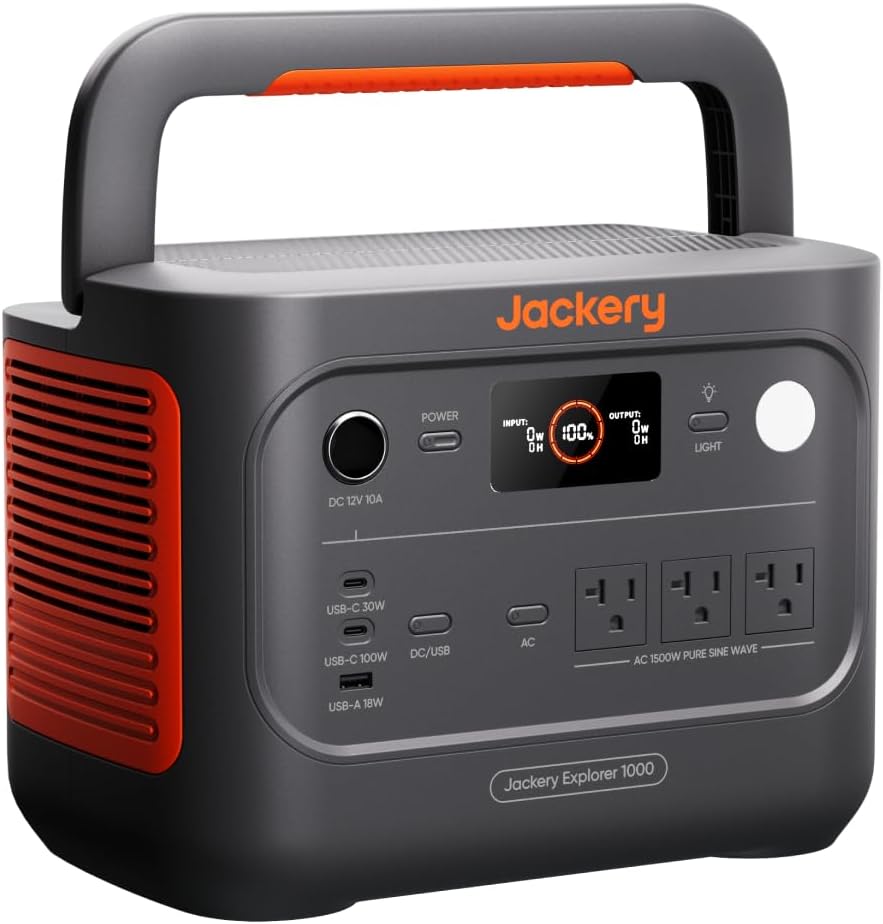
A 1070Wh lithium power station (Amazon lists it as 1024Wh) with 1500W of AC output, three mains sockets, three USB ports and a pair of DC inputs for solar. The manual gives the model as JE-1000D, the chemistry as LiFePO4, and the weight as 23.8 lb / 10.8 kg.
The important number is the chemistry. LiFePO4 is why this is worth reviewing at all.
4000 cycles is the reason to care
Jackery states 4000 cycles to 70% or more capacity. That is the figure that separates current power stations from the ones sold five years ago, and it changes what the product is: a battery you buy once rather than a consumable you replace.
The comparison that matters is not against other brands but against the older lithium-ion cells, which were good for a few hundred full cycles. At 4000, a nightly charge/discharge would take a decade to reach the rated end of life.
What works
- LiFePO4 with a stated 4000 cycles to 70% capacity
- 1500W rated / 3000W surge, pure sine wave
- Three AC outlets plus 100W USB-C, 30W USB-C and 18W USB-A
- Two DC barrel inputs for solar, up to 400W combined
- Manual is explicit about the UPS limits rather than burying them
What doesn't
- 20ms switching, not 10ms, and the manual tells you not to use it on servers
- 23.8 lb / 10.8 kg — portable across a room, not up a hill
- Outputs shut off automatically after 12 hours even under 25W
- Emergency fast charge is an app setting Jackery advises against using routinely
The UPS claim, and the line that contradicts it
The Amazon listing says 10ms UPS. Jackery's manual says this:
"In the event of a sudden loss of mains power, the product can automatically switch to battery mode within 20ms. This product does not support 0ms switching."
And then, more directly:
"Do not connect to equipment with high uninterruptible power requirements such as data servers and workstations."
That is unusually honest, and it is the paragraph worth reading before buying this as a computer battery.
At 20ms, a desktop PSU will typically drop and reboot. The margin between "this saves my work" and "this reboots my machine anyway" is a handful of milliseconds, and this product is on the wrong side of it. For a router, a switch, a few LED lights or a fridge, 20ms is invisible — those devices do not care.
A power station that switches in 20ms is an excellent backup for things that tolerate a blink. It is not a UPS, whatever the listing says.
The rival at the same size
BLUETTI's Elite 100 V2 is the direct competitor: same 1024Wh, same LiFePO4, similar money — but 1800W instead of 1500W, 140W USB-C instead of 100W, and a UPS switchover of 10ms rather than 20ms. That last figure is documented in BLUETTI's manual specification table, and it is the one number in this comparison that changes what the product can safely be used for.
If you are buying for outage protection rather than camping, read the BLUETTI Elite 100 V2 review before deciding.
1024Wh or 1070Wh?
The Amazon listing says 1024Wh. Jackery's manual says 30.4Ah/35.2V DC (1070Wh).
Both are defensible and they are describing slightly different things. 30.4 × 35.2 is 1070.08, so the manual figure is the direct arithmetic on the pack. The listing's 1024Wh is the more conservative usable number, which is usually what a manufacturer quotes when it is being careful about what you can actually draw.
Plan the capacity around the smaller figure. If you need it to run a 100W load for ten hours, 1024Wh is the number to use, and inverter losses take more off the top.
The 12-hour cutoff
Buried in the output table:
"All outputs turned off automatically after 12 hours" — for loads at or below 25W.
That is a sensible protection against a slow drain nobody notices, and it is also a surprise the first time it happens: a router running at 15W will simply stop after twelve hours. If you are using this to keep a low-draw device alive overnight, check the app's settings.
Ports, in detail
The manual's specification block is precise, which is worth reproducing because the round numbers hide the useful detail:
| AC outputs (×3) | 1500W rated, 3000W surge, 120V 60Hz |
|---|---|
| USB-C1 | 100W max (20V × 5A) |
| USB-C2 | 30W max |
| USB-A | 18W max |
| Car port | 12V × 10A |
| AC charging input | 100–120V, 15A max |
| DC inputs (×2) | 12–16V × 8A, or 16–60V × 10.5A, combined 400W max |
The 100W USB-C port means a laptop can be charged without using an AC outlet, which matters more than it sounds: every AC outlet used is inverter loss, and every USB port is direct current.
Charging, including the mode not to use
The 50-minute fast charge is real, and it is available as an emergency charging mode the app enables. Jackery's own advice:
"To maximize battery life, it is best to charge at normal speed... not recommended for regular, long-term use."
So the headline charge time is a capability, not a habit. Heat is the enemy of battery life, and cramming 1070Wh into the cells in under an hour produces a lot of it.
Who it is for
Someone preparing for outages, using a van, or camping with a fridge — where a ten-millisecond difference in switchover is not a concept that applies.
Not someone protecting a workstation. Not someone expecting an online double-conversion UPS, because those cost more and weigh more for exactly this reason.
Questions
Is the UPS switch 10ms or 20ms?
Jackery's manual says the unit switches to battery within 20ms and states plainly that it does not support 0ms switching. The Amazon listing says 10ms. Trust the manual for a continuity requirement.
Can it run a desktop computer?
The manual says do not connect equipment with high uninterruptible power requirements such as data servers and workstations. A desktop is not a server, but 20ms will usually reboot a PSU, so test before relying on it.
How long does 1070Wh last?
That depends entirely on the load. Divide by draw: a 100W load is roughly ten hours on paper, less in practice because of inverter losses. Jackery does not publish an efficiency figure here.
Is the battery really 4000 cycles?
Jackery states 4000 cycles to 70% or more capacity. It is the manufacturer's figure and the main practical advantage of LiFePO4 over the older NMC cells.
Does it come with solar panels?
No. The package list is the AC charging cable and the manual. Solar panels are a separate purchase.
Sources
The bottom line
If it suits how you actually use your network, this is the one to buy.
Check price on AmazonWas this review useful?
Thanks — that helps.
Comments
No comments yet. If something here is wrong or missing, say so — corrections get fixed.